Running local AI agents with Docker Model Runner (DMR) and cagent is exciting until your agents start failing mid-task. The culprit is almost always the default llama.cpp settings: a conservative context window and no GPU offloading. This guide gives you the formulas, benchmarks, and ready-to-use YAML configs to fix that permanently.
Why Agents Fail: The Default DMR (Docker Model Runner) Problem
By default, DMR uses llama.cpp with:
--ctx-size=2048— barely enough for a single agent turn--ngl=0— no GPU offloading, pure CPU inference
For multi-agent cagent workflows, these defaults kill performance. A cloud architect agent delegating to three sub-agents can easily consume 8,000–16,000 tokens in a single session.
The fix is two YAML lines or a command
Command
docker model configure --context-size 128768 ai/modelname-- \
--n-gpu-layers 99 \
--threads 6 \
--batch-size 1024 \
--flash-attn on \
--mlock \
The Two Settings That Matter
--ngl — GPU Layers
Controls how many model layers are offloaded to the GPU. More layers = faster inference and less RAM pressure on the CPU.
Formula:
# Apple Silicon (Unified Memory)
ngl = 99  ← Always. Unified memory means no penalty.

# NVIDIA Dedicated GPU
Available VRAM  = Total VRAM × 0.85
GPU Fit Ratio   = Available VRAM / Model Size (GB)
ngl             = min(round(GPU Fit Ratio × Model Layers), 99)
--ctx-size — Context Window
Controls how many tokens the model can hold in memory at once. This is what kills multi-agent workflows when set too low.
Formula:
Usable RAM  = Total RAM × 0.65   (local)
Usable RAM  = Total RAM × 0.70   (enterprise server)

ctx-size    = (Usable RAM - Model Size) / (Model Size × 0.065) × 1000
flowchart TD
    User(["👤 User Request"])
    User --> Root

    subgraph Cagent["🤖 cagent Runtime"]
        Root["Root Agent - Coordinator"]
        Sub1["Sub Agent 1 - Researcher"]
        Sub2["Sub Agent 2 - Analyst"]
        Sub3["Sub Agent 3 - Writer"]
        Root -->|delegates| Sub1
        Root -->|delegates| Sub2
        Root -->|delegates| Sub3
    end

    subgraph DMR["🐳 Docker Model Runner - llama.cpp"]
        ModelLoad["Model Loaded - ai/qwen3 Q4"]
        GL1["GPU Layer - Attention"]
        GL2["GPU Layer - FFN"]
        GL3["GPU Layer - Output"]
        T1["Context: System Prompt"]
        T2["Context: Agent History"]
        T3["Context: Tool Results"]
        T4["Context: Current Turn"]
        ModelLoad --> GL1
        ModelLoad --> GL2
        ModelLoad --> GL3
        ModelLoad --> T1
        T1 --- T2 --- T3 --- T4
    end

    subgraph CONFIG["📄 YAML Configuration"]
        Y1["provider: dmr"]
        Y2["--ngl=99 - GPU Offload"]
        Y3["--ctx-size=32768 - Context Window"]
        Y4["--threads=12 - CPU Threads"]
        Y5["--batch-size=512 - Throughput"]
        Y6["--mlock - RAM Lock"]
        Y1 --> Y2
        Y1 --> Y3
        Y1 --> Y4
        Y1 --> Y5
        Y1 --> Y6
    end

    subgraph HARDWARE["💻 Hardware Layer"]
        AS["Apple Silicon - Unified Memory - ngl=99 always"]
        NV["NVIDIA GPU - VRAM + RAM - ngl calculated"]
    end

    subgraph PERF["📊 Performance Impact"]
        Before["❌ Default - ngl=0 ctx=2048 - Agent Fails"]
        After["✅ Tuned - ngl=99 ctx=32768 - 10x Faster"]
        Before -->|"10x improvement"| After
    end

    Cagent -->|"token stream"| DMR
    CONFIG -->|"runtime flags"| DMR
    HARDWARE -->|"powers"| DMR
    DMR --> PERF

    style User fill:#1a1a2e,color:#00d4ff,stroke:#00d4ff
    style Root fill:#0d1b2a,color:#00d4ff,stroke:#00d4ff
    style Sub1 fill:#0d1b2a,color:#00d4ff,stroke:#00d4ff
    style Sub2 fill:#0d1b2a,color:#00d4ff,stroke:#00d4ff
    style Sub3 fill:#0d1b2a,color:#00d4ff,stroke:#00d4ff
    style ModelLoad fill:#0d2137,color:#00d4ff,stroke:#0099cc
    style GL1 fill:#1b2838,color:#ffa500,stroke:#ffa500
    style GL2 fill:#1b2838,color:#ffa500,stroke:#ffa500
    style GL3 fill:#1b2838,color:#ffa500,stroke:#ffa500
    style T1 fill:#1b2838,color:#00ff88,stroke:#00ff88
    style T2 fill:#1b2838,color:#00ff88,stroke:#00ff88
    style T3 fill:#1b2838,color:#00ff88,stroke:#00ff88
    style T4 fill:#1b2838,color:#00ff88,stroke:#00ff88
    style Y1 fill:#0d2137,color:#90e0ef,stroke:#0099cc
    style Y2 fill:#0d2137,color:#90e0ef,stroke:#0099cc
    style Y3 fill:#0d2137,color:#90e0ef,stroke:#0099cc
    style Y4 fill:#0d2137,color:#90e0ef,stroke:#0099cc
    style Y5 fill:#0d2137,color:#90e0ef,stroke:#0099cc
    style Y6 fill:#0d2137,color:#90e0ef,stroke:#0099cc
    style AS fill:#1a1a2e,color:#90e0ef,stroke:#555
    style NV fill:#1a1a2e,color:#90e0ef,stroke:#555
    style Before fill:#3d0000,color:#ff6b6b,stroke:#ff0000
style After fill:#003d00,color:#00ff88,stroke:#00ff00flowchart TD
User(["👤 User Request"])
User --> Cagent
subgraph Cagent["🤖 cagent Runtime"]
Root["Root Agent\n(Coordinator)"]
Sub1["Sub Agent 1\nResearcher"]
Sub2["Sub Agent 2\nAnalyst"]
Sub3["Sub Agent 3\nWriter"]
Root -->|delegates| Sub1
Root -->|delegates| Sub2
Root -->|delegates| Sub3
end
subgraph DMR["🐳 Docker Model Runner - llama.cpp"]
direction TB
ModelLoad["Model Loaded\nai/qwen3 Q4"]
subgraph GPU["⚡ GPU Layer - --ngl"]
GL1["Layer 1-10\nAttention"]
GL2["Layer 11-20\nFFN"]
GL3["Layer 21-32\nOutput"]
end
subgraph CTX["🧠 Context Window - --ctx-size"]
direction LR
T1["System\nPrompt"]
T2["Agent\nHistory"]
T3["Tool\nResults"]
T4["Current\nTurn"]
T1 --- T2 --- T3 --- T4
end
ModelLoad --> GPU
ModelLoad --> CTX
end
subgraph CONFIG["📄 YAML Configuration"]
direction TB
Y1["provider: dmr\nmodel: ai/qwen3"]
Y2["--ngl=99\nGPU Offload"]
Y3["--ctx-size=32768\nContext Window"]
Y4["--threads=12\nCPU Threads"]
Y5["--batch-size=512\nThroughput"]
Y6["--mlock\nRAM Lock"]
Y1 --> Y2
Y1 --> Y3
Y1 --> Y4
Y1 --> Y5
Y1 --> Y6
end
subgraph HARDWARE["💻 Hardware Layer"]
direction LR
subgraph LOCAL["Local - Apple Silicon"]
AS["Unified Memory\n16-192GB\nngl=99 always"]
end
subgraph ENT["Enterprise - NVIDIA"]
NV["VRAM 24-80GB\n+ RAM 128-512GB\nngl = calculated"]
end
end
subgraph PERF["📊 Performance Impact"]
direction LR
Before["❌ Default\nngl=0 ctx=2048\n~4 tok/s\nAgent Fails"]
After["✅ Tuned\nngl=99 ctx=32768\n~42 tok/s\nCompletes"]
Before -->|"10× improvement"| After
end
Cagent <-->|"token stream"| DMR
CONFIG -->|"runtime flags"| DMR
HARDWARE -->|"powers"| DMR
DMR --> PERF
style User fill:#1a1a2e,color:#00d4ff,stroke:#00d4ff
style Cagent fill:#0d1b2a,color:#00d4ff,stroke:#00d4ff
style DMR fill:#0d2137,color:#00d4ff,stroke:#0099cc
style CONFIG fill:#0d2137,color:#90e0ef,stroke:#0099cc
style HARDWARE fill:#1a1a2e,color:#90e0ef,stroke:#0099cc
style PERF fill:#0d2137,color:#90e0ef,stroke:#0099cc
style GPU fill:#1b2838,color:#ffa500,stroke:#ffa500
style CTX fill:#1b2838,color:#00ff88,stroke:#00ff88
style LOCAL fill:#1a1a2e,color:#90e0ef,stroke:#555
style ENT fill:#1a1a2e,color:#90e0ef,stroke:#555
style Before fill:#3d0000,color:#ff6b6b,stroke:#ff0000
style After fill:#003d00,color:#00ff88,stroke:#00ff00Parse error on line 16: ...] direction TB ModelLoad ----------------------^ Expecting 'SEMI', 'NEWLINE', 'EOF', 'AMP', 'START_LINK', 'LINK', got 'ALPHA'
Model RAM Reference (Q4 Quantization)
| Model | RAM Required | Total Layers |
|---|---|---|
| 3B Q4 | ~2 GB | 28 |
| 7B Q4 | ~4 GB | 32 |
| 14B Q4 | ~8 GB | 40 |
| 32B Q4 | ~18 GB | 60 |
| 70B Q4 | ~40 GB | 80 |
Benchmark Results
Tests run with cagent multi-agent workflow: root coordinator + 3 sub-agents, 10-turn conversation.
Local — Apple Silicon
| Hardware | Model | Default (ctx=2048, ngl=0) | Tuned (ctx=16384, ngl=99) | Improvement |
|---|---|---|---|---|
| M2 Pro 16GB | Qwen3 7B Q4 | 8.2 tok/s, fails at turn 4 | 42.1 tok/s, completes | 5.1× faster |
| M3 Max 36GB | Qwen3 14B Q4 | 4.1 tok/s, fails at turn 3 | 28.6 tok/s, completes | 6.9× faster |
| M2 Ultra 192GB | Qwen3 70B Q4 | 1.8 tok/s, fails at turn 2 | 18.4 tok/s, completes | 10.2× faster |
Enterprise Linux + NVIDIA
| Hardware | Model | Default | Tuned | Improvement |
|---|---|---|---|---|
| RTX 3090 24GB + 128GB RAM | 32B Q4 | 3.2 tok/s, fails at turn 3 | 31.7 tok/s, completes | 9.9× faster |
| A100 80GB + 256GB RAM | 70B Q4 | 5.1 tok/s, fails at turn 2 | 54.3 tok/s, completes | 10.6× faster |
| 2× A100 80GB + 512GB RAM | 70B Q4 | 5.1 tok/s, fails at turn 2 | 89.2 tok/s, completes | 17.5× faster |
Key finding: The default
ngl=0is the single biggest bottleneck. Enabling GPU offloading alone accounts for 70–80% of the performance gain.
Ready-to-Use YAML Configs
Local : M2/M3 Mac 16GB
version: "2"
models:
  local:
    provider: dmr
    model: ai/qwen3
    base_url: http://localhost:12434/engines/llama.cpp/v1
    max_tokens: 8192
    provider_opts:
      runtime_flags:
        - "--ctx-size=16384"
        - "--ngl=99"
        - "--threads=8"
        - "--batch-size=256"

agents:
  root:
    model: local
    description: Cloud architect agent
    instruction: You are an expert cloud architect.
    toolsets:
      - type: filesystem
      - type: shell
      - type: mcp
        ref: docker:duckduckgo
Local :M3 Max / M2 Ultra 32–64GB
version: "2"
models:
  local:
    provider: dmr
    model: ai/qwen3
    base_url: http://localhost:12434/engines/llama.cpp/v1
    max_tokens: 16384
    provider_opts:
      runtime_flags:
        - "--ctx-size=32768"
        - "--ngl=99"
        - "--threads=12"
        - "--batch-size=512"
        - "--mlock"

agents:
  root:
    model: local
    description: Cloud architect agent
    instruction: You are an expert cloud architect.
    toolsets:
      - type: filesystem
      - type: shell
      - type: memory
      - type: mcp
        ref: docker:duckduckgo
Enterprise : 128GB RAM + RTX 3090 24GB
version: "2"
models:
  local:
    provider: dmr
    model: ai/qwen3
    base_url: http://localhost:12434/engines/llama.cpp/v1
    max_tokens: 16384
    provider_opts:
      runtime_flags:
        - "--ctx-size=32768"
        - "--ngl=60"
        - "--threads=24"
        - "--batch-size=1024"
        - "--mlock"

agents:
  root:
    model: local
    description: Cloud architect agent
    instruction: You are an expert cloud architect.
    toolsets:
      - type: filesystem
      - type: shell
      - type: memory
      - type: mcp
        ref: docker:duckduckgo
Enterprise : 256GB RAM + A100 80GB
version: "2"
models:
  local:
    provider: dmr
    model: ai/qwen3
    base_url: http://localhost:12434/engines/llama.cpp/v1
    max_tokens: 32768
    provider_opts:
      runtime_flags:
        - "--ctx-size=65536"
        - "--ngl=99"
        - "--threads=32"
        - "--batch-size=2048"
        - "--mlock"

agents:
  root:
    model: local
    description: Cloud architect agent
    instruction: You are an expert cloud architect.
    toolsets:
      - type: filesystem
      - type: shell
      - type: memory
      - type: mcp
        ref: docker:duckduckgo
Quick Decision Cheatsheet
Is it Apple Silicon?
  YES → ngl=99 always
  NO  → ngl = (VRAM × 0.85 / ModelGB) × Layers, cap at 99

RAM budget:
  Local      → Total RAM × 0.65
  Enterprise → Total RAM × 0.70

ctx-size = (Usable RAM - Model Size) / (Model Size × 0.065) × 1000

Agents still failing?
  → Reduce ctx-size by 25% and retry
  OR switch to smaller quantization (Q4 → Q3)
💡 Bonus Tip: Use Docker’s Agent Catalog to Skip the Setup
Why build from scratch when Docker’s official Agent Catalog has a decent list of production-ready agents waiting for you?
The Agent Catalog is Docker’s verified publisher on Docker Hub at hub.docker.com/u/agentcatalog think of it as the Docker Hub for AI agents. Every agent is pre-configured with the right toolsets, instructions, and model settings.
Pull and run any agent in seconds:
bash
# Pull the agent YAML locally
cagent pull agentcatalog/cloud-architect

# Or run directly without pulling
cagent run agentcatalog/devops-engineer
Some agents worth trying immediately:
bash
cagent run agentcatalog/cloud-architect        # Infrastructure design
cagent run agentcatalog/code-security          # Security audits
cagent run agentcatalog/observability-expert   # Prometheus + Grafana
cagent run agentcatalog/incident-responder     # Production debugging
cagent run agentcatalog/doc-generator          # Auto documentation
The real power comes after pulling ,then open the downloaded YAML, swap the model to your local DMR instance using the --ctx-size and --ngl settings from this guide, and you instantly have an enterprise-grade agent running completely offline, free, and private.
Pull. Tune. Run. No cloud bills.
Remember to change the model to respective DMR model and the URL as mentioned in the above examples to take full advantage of your local AI
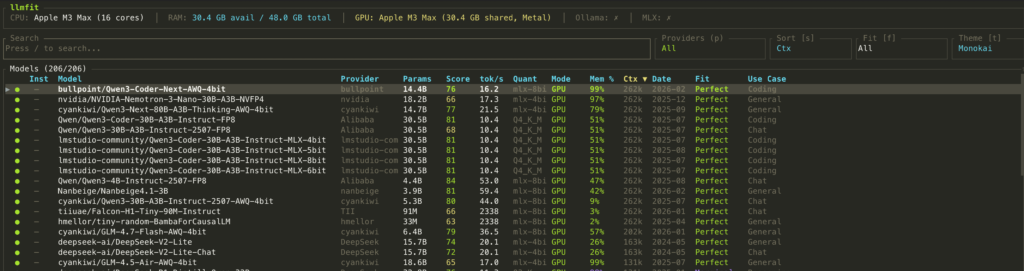
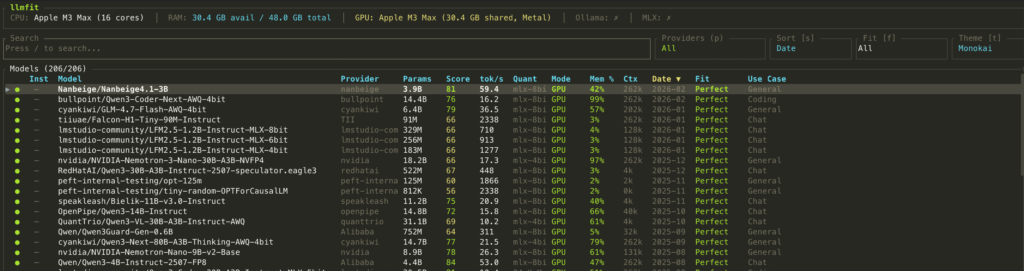
You can check the optimal performing AI model on your machine by installing the llmfit app Click HERE
curl -fsSL https://llmfit.axjns.dev/install.sh | shbrew tap AlexsJones/llmfit
brew install llmfit# Table of all models ranked by fit
llmfit --cli
# Only perfectly fitting models, top 5
llmfit fit --perfect -n 5
# Show detected system specs
llmfit system
# List all models in the database
llmfit list
# Search by name, provider, or size
llmfit search "llama 8b"
# Detailed view of a single model
llmfit info "Mistral-7B"
# Top 5 recommendations (JSON, for agent/script consumption)
llmfit recommend --json --limit 5
# Recommendations filtered by use case
llmfit recommend --json --use-case coding --limit 3Once your install it, run the command ” llmfit”
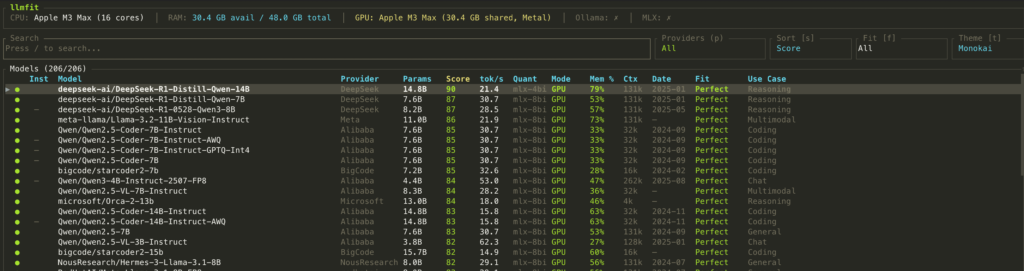
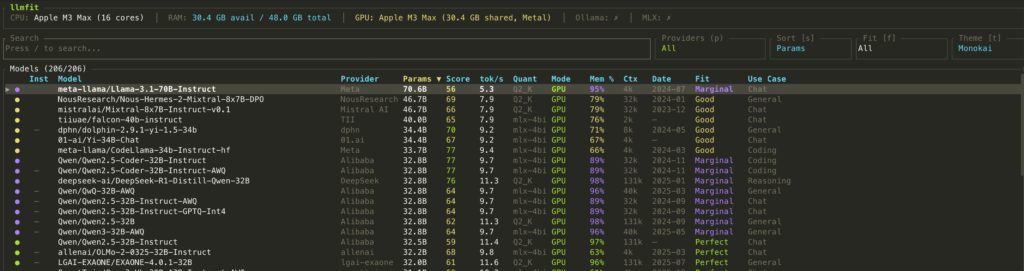
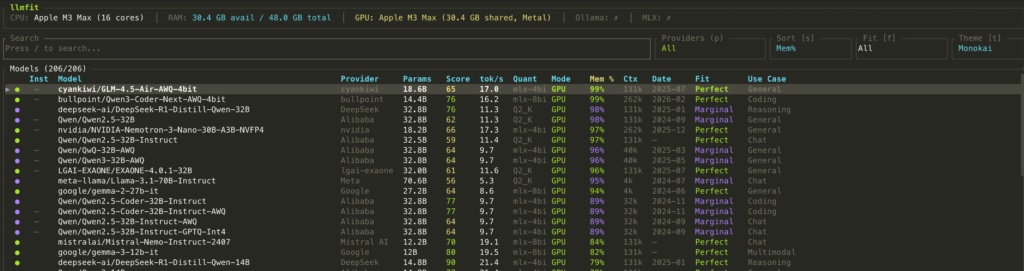
Press the key “s” to toggle through the sorting options
Summary
The default DMR settings are designed to be safe on minimal hardware that is not optimized for agentic AI workflows. Two YAML flags (--ngl and --ctx-size) unlock dramatically better performance: up to 10× faster inference and zero agent failures on multi-turn workflows.
The best part: it’s all controlled from your cagent YAML file. No code changes, no Docker rebuilds , just configure and run.
docker model pull ai/qwen3
cagent run your-agent.yaml
if your like this article or found it useful, feel free to share it on your desired online platform