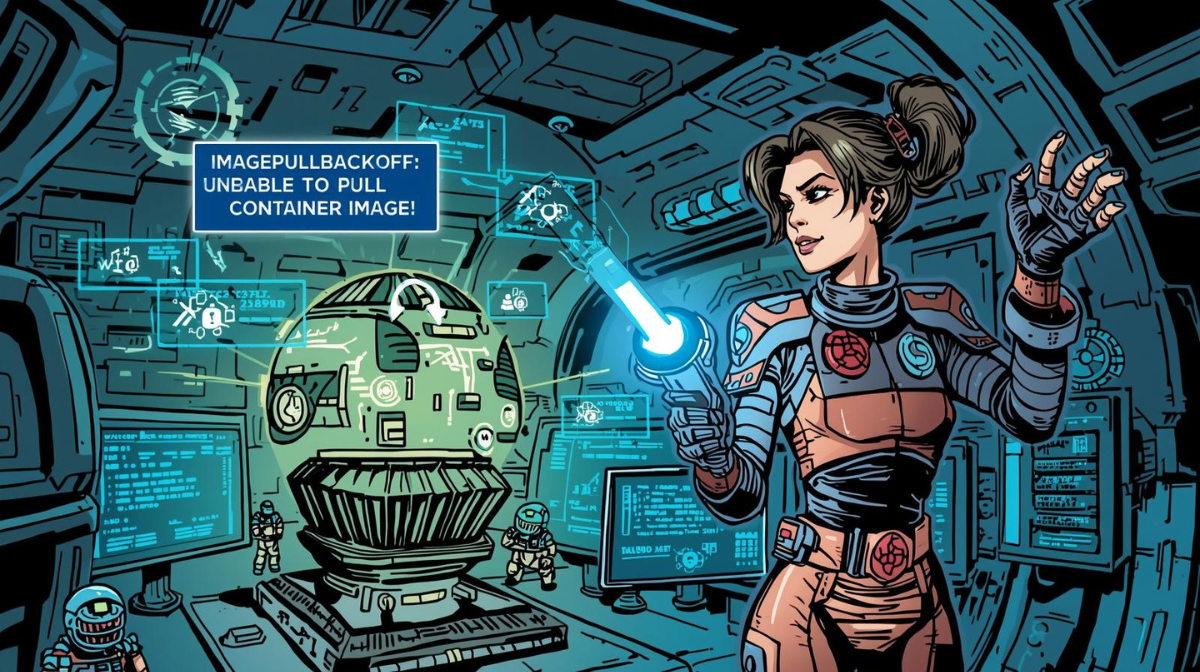
What is ImagePullBackOff in Kubernetes?
If you’ve worked with Kubernetes, chances are you’ve encountered the dreaded ImagePullBackOff error. This status indicates that your container runtime failed to pull a container image from a registry, and Kubernetes has entered an exponential back-off retry state.
Unlike a continuous retry loop that could overwhelm your container registry, Kubernetes intelligently waits between retry attempts—starting at 10 seconds and doubling up to a maximum of 5 minutes. This mechanism protects your infrastructure while giving you time to diagnose and fix the underlying issue.
How ImagePullBackOff Works: The Back-off Mechanism
Let’s visualize the retry behavior with a sequence diagram:
sequenceDiagram
    participant K as Kubelet
    participant R as Container Registry

    K->>R: Pull Image (Attempt 1)
    R-->>K: Failed
    Note over K: Wait 10s (ErrImagePull)

    K->>R: Pull Image (Attempt 2)
    R-->>K: Failed
    Note over K: Wait 20s (ImagePullBackOff)

    K->>R: Pull Image (Attempt 3)
    R-->>K: Failed
    Note over K: Wait 40s (ImagePullBackOff)

    K->>R: Pull Image (Attempt 4)
    R-->>K: Failed
    Note over K: Wait 80s (ImagePullBackOff)

    K->>R: Pull Image (Attempt 5)
    R-->>K: Failed
Note over K: Wait 300s (max backoff)Common Causes of ImagePullBackOff
1. Invalid Image Name or Tag
The most frequent culprit is a simple typo or incorrect tag:
apiVersion: v1
kind: Pod
metadata:
  name: broken-pod
spec:
  containers:
  - name: app
    image: ngnix:latest  # Typo! Should be "nginx"
2. Authentication Issues with Private Registries
When pulling from private registries like Docker Hub, AWS ECR, or Google Container Registry, you need proper credentials:
apiVersion: v1
kind: Pod
metadata:
  name: private-app
spec:
  containers:
  - name: app
    image: mycompany.azurecr.io/private-app:v1.0.0
  imagePullSecrets:
  - name: acr-secret  # Reference to authentication secret
3. Network and Connectivity Problems
flowchart TD
    A[Pod Scheduled] --> B{Can reach registry?}
    B -->|Yes| C{DNS resolves?}
    B -->|No| D[Network/Firewall Issue]
    C -->|Yes| E{Authentication valid?}
    C -->|No| F[DNS Configuration Error]
    E -->|Yes| G{Image exists?}
    E -->|No| H[Auth Failure - ImagePullBackOff]
    G -->|Yes| I[Pull Success]
G -->|No| J[Image Not Found - ImagePullBackOff]Step-by-Step Troubleshooting Guide
Step 1: Verify Pod Status
kubectl get pods

# Output:
# NAME          READY   STATUS              RESTARTS   AGE
# my-app-pod    0/1     ImagePullBackOff    0          2m
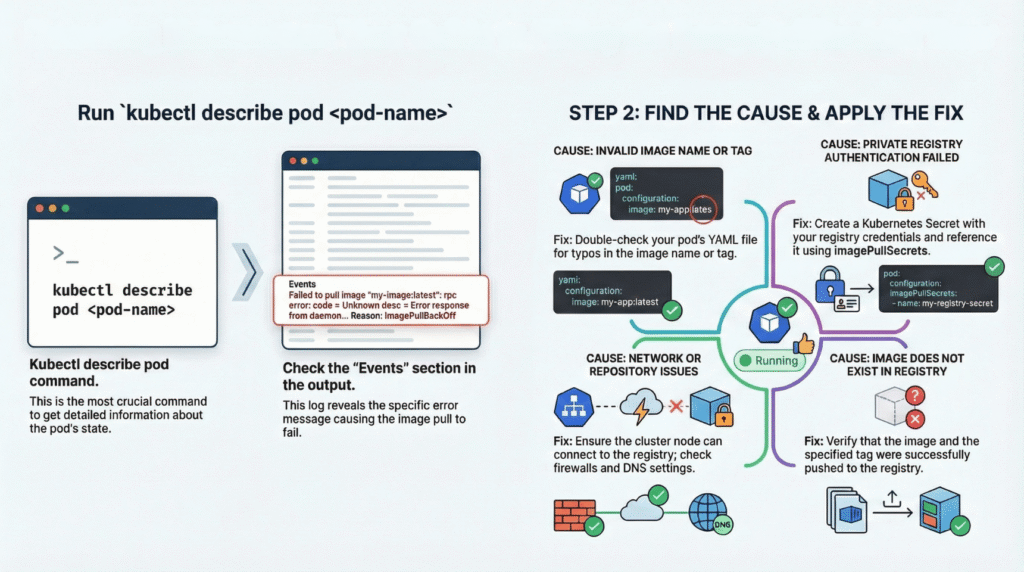
Step 2: Inspect Pod Events (Most Critical!)
kubectl describe pod my-app-pod

# Look for Events section:
# Events:
#   Type     Reason     Message
#   ----     ------     -------
#   Normal   Scheduled  Successfully assigned default/my-app-pod to node-1
#   Normal   Pulling    Pulling image "nginx:latests"
#   Warning  Failed     Failed to pull image "nginx:latests": rpc error:
#                       code = Unknown desc = Error response from daemon:
#                       manifest for nginx:latests not found
#   Warning  Failed     Error: ErrImagePull
#   Normal   BackOff    Back-off pulling image "nginx:latests"
#   Warning  Failed     Error: ImagePullBackOff
Step 3: Check Image Configuration
# Verify the exact image specification
kubectl get pod my-app-pod -o jsonpath='{.spec.containers[*].image}'
Step 4: Test Manual Pull
# SSH into the node
kubectl get pods -o wide  # Get node name

# On the node, try pulling manually
docker pull nginx:latests
# or with containerd
crictl pull nginx:latests
Step 5: Verify Secrets for Private Registries
# List secrets
kubectl get secrets

# Inspect the imagePullSecret
kubectl get secret my-registry-secret -o yaml

# Check secret data (base64 encoded)
kubectl get secret my-registry-secret -o jsonpath='{.data.\.dockerconfigjson}' | base64 -d
Fixing ImagePullBackOff Errors
Fix 1: Correct Image Reference
apiVersion: apps/v1
kind: Deployment
metadata:
  name: nginx-deployment
spec:
  replicas: 3
  selector:
    matchLabels:
      app: nginx
  template:
    metadata:
      labels:
        app: nginx
    spec:
      containers:
      - name: nginx
        image: nginx:1.21.6  # Use specific version tag
        imagePullPolicy: IfNotPresent
Fix 2: Create Docker Registry Secret
# For Docker Hub
kubectl create secret docker-registry dockerhub-secret \
  --docker-server=docker.io \
  --docker-username=your-username \
  --docker-password=your-password \
  --docker-email=your-email@example.com

# For AWS ECR
kubectl create secret docker-registry ecr-secret \
  --docker-server=123456789.dkr.ecr.us-east-1.amazonaws.com \
  --docker-username=AWS \
  --docker-password=$(aws ecr get-login-password --region us-east-1)
Then reference it in your deployment:
spec:
  imagePullSecrets:
  - name: dockerhub-secret
  containers:
  - name: app
    image: username/private-image:v1.0.0
Fix 3: Configure Service Account
apiVersion: v1
kind: ServiceAccount
metadata:
  name: app-sa
imagePullSecrets:
- name: dockerhub-secret
---
apiVersion: v1
kind: Pod
metadata:
  name: private-pod
spec:
  serviceAccountName: app-sa
  containers:
  - name: app
    image: username/private-image:v1.0.0
Best Practices to Prevent ImagePullBackOff
1. Use Immutable Tags
# ❌ Bad: Mutable tag
image: myapp:latest

# ✅ Good: Specific version
image: myapp:v2.1.3

# ✅ Better: Image digest (SHA256)
image: myapp@sha256:abcdef123456...
2. Optimize Pull Policy
containers:
- name: app
  image: nginx:1.21.6
  imagePullPolicy: IfNotPresent  # Use cached image if available
3. Set Up Monitoring
# Prometheus alert example
- alert: ImagePullBackOff
  expr: kube_pod_container_status_waiting_reason{reason="ImagePullBackOff"} > 0
  for: 5m
  labels:
    severity: warning
  annotations:
    summary: "Pod {{ $labels.pod }} has ImagePullBackOff"
Troubleshooting Decision Tree
flowchart TD
    Start[ImagePullBackOff Detected] --> Describe[kubectl describe pod]
    Describe --> Auth{Authentication<br/>Error?}
    Auth -->|Yes| CreateSecret[Create/Update<br/>imagePullSecret]
    Auth -->|No| Name{Image Name<br/>Correct?}
    Name -->|No| FixYAML[Fix Deployment<br/>YAML]
    Name -->|Yes| Network{Network<br/>Issue?}
    Network -->|Yes| CheckDNS[Check DNS/Firewall]
    Network -->|No| Registry{Registry<br/>Available?}
    Registry -->|No| WaitRetry[Wait for Registry]
    Registry -->|Yes| RateLimit[Check Rate Limits]

    CreateSecret --> Apply[Apply Changes]
    FixYAML --> Apply
    CheckDNS --> Apply
    WaitRetry --> Apply
    RateLimit --> Apply
Apply --> Success[Pod Running]Conclusion
ImagePullBackOff is one of the most common Kubernetes errors, but it’s also one of the easiest to diagnose using kubectl describe pod. The key is understanding the exponential back-off mechanism and systematically checking image names, authentication, network connectivity, and registry availability.
By following the troubleshooting steps outlined above and implementing best practices like using specific image tags and proper imagePullSecrets, you can minimize downtime and keep your Kubernetes clusters running smoothly.
Below is the high level visual guide to troubleshoot ImagePullOff Error
Keywords: Kubernetes ImagePullBackOff, ErrImagePull, kubectl troubleshooting, container registry authentication, imagePullSecrets, Kubernetes debugging, pod errors, container image pull failed