Introduction
Imagine building an application where you don’t need to choose between a document database, a graph database, or a relational database. What if one database could handle real-time updates, complex relationships, and full-text search without juggling multiple systems? Enter SurrealDB – a next-generation, multi-model database that’s changing how developers think about data storage.
In this comprehensive guide, we’ll explore what makes SurrealDB special, how to get started with it, and why it might be the perfect choice for your next project.
What is SurrealDB?
SurrealDB is a multi-model database built in Rust that combines the best features of document, graph, relational, key-value, and time-series databases into a single, unified platform. Think of it as having PostgreSQL, MongoDB, Neo4j, and Redis all rolled into one powerful system.
But SurrealDB goes beyond just data storage. It’s also a complete backend-as-a-service (BaaS) with built-in authentication, permissions, and a real-time API layer – drastically simplifying your application architecture.
graph TB
    A[Your Application] --> B[SurrealDB]
    B --> C[Document Storage]
    B --> D[Graph Relationships]
    B --> E[Relational Tables]
    B --> F[Real-time Subscriptions]
    B --> G[Built-in Auth & Permissions]

    style B fill:#ff00a0,stroke:#fff,stroke-width:3px,color:#fff
style A fill:#4a90e2,stroke:#fff,stroke-width:2px,color:#fffWhy Traditional Database Stacks Are Complex
Most modern applications require multiple specialized databases, each adding complexity to your infrastructure:
flowchart LR
    A[App Server] --> B[PostgreSQL<br/>Relational Data]
    A --> C[MongoDB<br/>Documents]
    A --> D[Neo4j<br/>Graph Data]
    A --> E[Redis<br/>Cache & Sessions]
    A --> F[Elasticsearch<br/>Full-text Search]

    style A fill:#ff6b6b,stroke:#333,stroke-width:2px
    style B fill:#4ecdc4,stroke:#333,stroke-width:2px
    style C fill:#95e1d3,stroke:#333,stroke-width:2px
    style D fill:#f38181,stroke:#333,stroke-width:2px
    style E fill:#aa96da,stroke:#333,stroke-width:2px
style F fill:#fcbad3,stroke:#333,stroke-width:2pxSurrealDB simplifies this by consolidating these capabilities into one system, reducing operational overhead, latency, and costs.
Key Features That Make SurrealDB Stand Out
1. Multi-Model Flexibility
Store your data however it makes sense – as documents, relational tables, or graph nodes – all in the same database.
2. Real-Time Everything
Built-in support for live queries means your application receives instant updates when data changes. No need for polling or complex WebSocket implementations.
3. Direct Client Connections
Frontend applications can connect directly to SurrealDB with row-level permissions, eliminating the need for a custom API layer.
sequenceDiagram
    participant Client as Web/Mobile App
    participant SDB as SurrealDB
    participant Data as Data Store

    Client->>SDB: Connect with Auth Token
    SDB->>SDB: Validate Permissions
    SDB->>Data: Execute Query
    Data-->>SDB: Return Results
    SDB-->>Client: Filtered Data (Row-Level Security)

    Note over Client,SDB: Real-time subscription active
    Data->>SDB: Data Changed
SDB->>Client: Live Update Notification4. SurrealQL: Powerful Yet Familiar
SurrealDB uses SurrealQL, an SQL-like query language that feels familiar but adds powerful graph traversal and modern features.
5. Embedded or Distributed
Run SurrealDB as an embedded library, a single-node server, or scale to hundreds of nodes in a distributed cluster.
Getting Started with SurrealDB Using Docker
Let’s get hands-on! The easiest way to start with SurrealDB is using Docker.
Quick Start with Docker
# Pull the latest SurrealDB image
docker pull surrealdb/surrealdb:latest

# Run SurrealDB with in-memory storage (perfect for development)
docker run --rm --name surrealdb \
  -p 8000:8000 \
  surrealdb/surrealdb:latest start \
  --log info \
  --user root \
  --pass root \
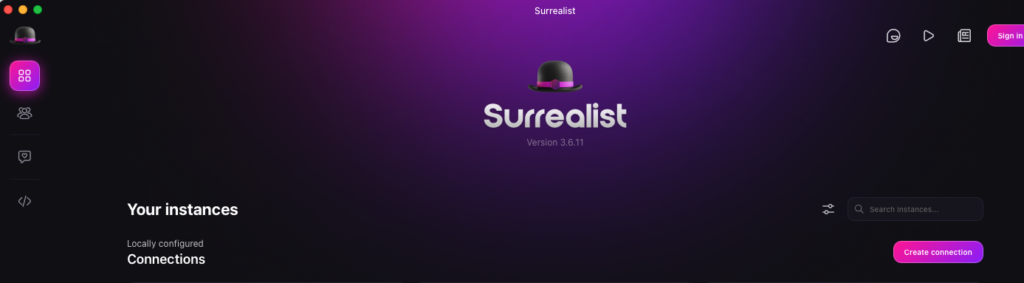
Download the surealist and choose anonymous option to connect to the container
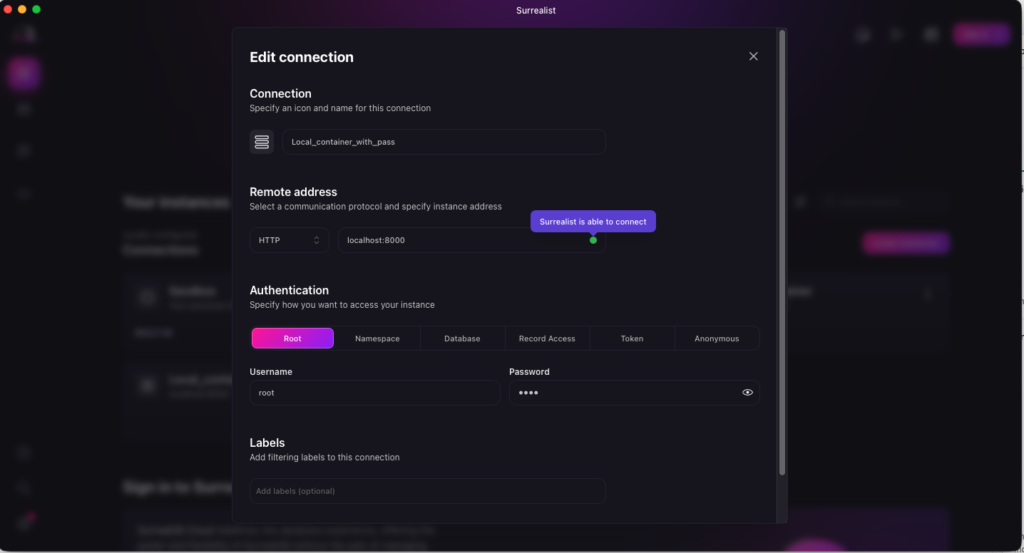
Click on create connection and configure as mentioned in the screenshot :
HTTP: localhost:8000
username: root
Password:root
username and password can be configured when you run the docker command mentioned above
Production-Ready Docker Compose Setup
For a more robust setup with persistent storage, create a docker-compose.yml:
version: '3.8'

services:
  surrealdb:
    image: surrealdb/surrealdb:latest
    container_name: surrealdb
    ports:
      - "8000:8000"
    volumes:
      - ./data:/data
    command: start --log info --user root --pass root file:/data/database.db
    restart: unless-stopped
    environment:
      - SURREAL_CAPS_ALLOW_ALL=true
    healthcheck:
      test: ["CMD", "curl", "-f", "http://localhost:8000/health"]
      interval: 30s
      timeout: 10s
      retries: 3
      start_period: 40s

volumes:
  data:
    driver: local
Start your database:
# Launch SurrealDB
docker-compose up -d

# Check logs
docker-compose logs -f surrealdb

# Access the container
docker exec -it surrealdb /bin/sh
Kubernetes Deployment Configuration
For production Kubernetes environments:
apiVersion: apps/v1
kind: Deployment
metadata:
  name: surrealdb
  labels:
    app: surrealdb
spec:
  replicas: 1
  selector:
    matchLabels:
      app: surrealdb
  template:
    metadata:
      labels:
        app: surrealdb
    spec:
      containers:
      - name: surrealdb
        image: surrealdb/surrealdb:latest
        ports:
        - containerPort: 8000
          name: http
        args:
          - start
          - --log
          - info
          - --user
          - root
          - --pass
          - root
          - file:/data/database.db
        volumeMounts:
        - name: data
          mountPath: /data
      volumes:
      - name: data
        persistentVolumeClaim:
          claimName: surrealdb-pvc
---
apiVersion: v1
kind: Service
metadata:
  name: surrealdb
spec:
  selector:
    app: surrealdb
  ports:
  - port: 8000
    targetPort: 8000
  type: LoadBalancer
Your First SurrealDB Queries
Once your database is running, let’s explore SurrealQL with practical examples.
Connect and Initialize
# Install SurrealDB CLI (optional, for local queries)
curl --proto '=https' --tlsv1.2 -sSf https://install.surrealdb.com | sh

# Connect to your running instance
surreal sql --endpoint http://localhost:8000 --username root --password root --namespace test --database test
Basic CRUD Operations
-- Create a user with structured data
CREATE user:john SET
    name = "John Doe",
    email = "john@example.com",
    age = 28,
    tags = ["developer", "kubernetes", "docker"],
    created_at = time::now();

-- Create multiple users at once
CREATE user SET name = "Jane Smith", email = "jane@example.com", age = 32;
CREATE user SET name = "Bob Wilson", email = "bob@example.com", age = 45;

-- Query users with filtering
SELECT * FROM user WHERE age > 25;

-- Update with computed values
UPDATE user:john SET
    age = 29,
    updated_at = time::now();

-- Delete a record
DELETE user:john;
Graph Relationships: The Power of SurrealDB
Here’s where SurrealDB truly shines – creating relationships as easily as documents:
-- Create a blog post
CREATE article:surreal_intro SET
    title = "Getting Started with SurrealDB",
    content = "SurrealDB is amazing...",
    published = true;

-- Create a relationship: user wrote article
RELATE user:jane->wrote->article:surreal_intro
    SET created_at = time::now();

-- Create another relationship: user likes article
RELATE user:bob->likes->article:surreal_intro
    SET timestamp = time::now();

-- Query: Find all articles written by Jane
SELECT * FROM user:jane->wrote->article;

-- Query: Find all users who liked this article
SELECT <-likes<-user.* FROM article:surreal_intro;

-- Advanced: Find articles liked by people who follow Jane
SELECT ->following->user->likes->article.* FROM user:jane;
Schema Definition and Permissions
-- Define a schemafull table with constraints
DEFINE TABLE user SCHEMAFULL;

DEFINE FIELD name ON TABLE user TYPE string ASSERT $value != NONE;
DEFINE FIELD email ON TABLE user TYPE string
    ASSERT string::is::email($value);
DEFINE FIELD age ON TABLE user TYPE int
    ASSERT $value >= 18 AND $value <= 120;

-- Add unique index
DEFINE INDEX unique_email ON TABLE user COLUMNS email UNIQUE;

-- Set permissions (users can only modify their own data)
DEFINE TABLE user PERMISSIONS
    FOR select, update, delete
    WHERE id = $auth.id;
Real-World Use Cases
mermaid
graph LR
    A[SurrealDB] --> B[Social Networks<br/>Complex Relationships]
    A --> C[IoT Applications<br/>Time-Series Data]
    A --> D[E-commerce<br/>Product Catalogs]
    A --> E[Real-Time Analytics<br/>Live Dashboards]
    A --> F[Knowledge Graphs<br/>AI/RAG Systems]

    style A fill:#ff00a0,stroke:#fff,stroke-width:3px,color:#fff
Who Should Use SurrealDB?
- Startups wanting to move fast without infrastructure complexity
- Developers building real-time collaborative applications
- DevOps teams seeking to reduce database sprawl
- Edge computing projects needing embedded databases
- AI/ML teams building knowledge graphs and RAG systems
Performance Characteristics
SurrealDB is built in Rust, offering:
- Low latency: Single-digit millisecond query times
- Small footprint: Runs efficiently on edge devices
- Horizontal scalability: Cluster mode for high-availability
- ACID compliance: Full transactional guarantees
SurrealDB Architecture Overview
graph TB
    subgraph "Client Layer"
        A1[Web Browser]
        A2[Mobile App]
        A3[Backend Service]
    end

    subgraph "SurrealDB Cluster"
        B1[Node 1]
        B2[Node 2]
        B3[Node 3]
    end

    subgraph "Storage Layer"
        C1[(RocksDB)]
        C2[(TiKV)]
        C3[(Memory)]
    end

    A1 & A2 & A3 --> B1 & B2 & B3
    B1 & B2 & B3 --> C1 & C2 & C3

    style B1 fill:#ff00a0,stroke:#fff,stroke-width:2px,color:#fff
    style B2 fill:#ff00a0,stroke:#fff,stroke-width:2px,color:#fff
style B3 fill:#ff00a0,stroke:#fff,stroke-width:2px,color:#fffGetting Help and Next Steps
Try SurrealDB Today
- Local Development: Use the Docker setup above to experiment locally
- SurrealDB Cloud: Sign up for a managed instance at surrealdb.com/cloud
- Community Support: Join the SurrealDB Discord with 30K+ members
Learning Resources
- Official Documentation: surrealdb.com/docs
- Interactive Book: “Aeon’s Surreal Renaissance” at surrealdb.com/learn/book
- SurrealDB University: Free courses at surrealdb.com/learn
- GitHub Repository: 30.6K+ stars at github.com/surrealdb/surrealdb
Connect & Contribute
- Discord Community: Real-time help and discussions
- GitHub: Contribute to the open-source project (BSL 1.1 license)
- Twitter/X: Follow @surrealdb for updates
Conclusion
SurrealDB represents a paradigm shift in how we think about databases. By combining multiple data models, real-time capabilities, and built-in security into one elegant solution, it dramatically simplifies modern application architecture.
Whether you’re building a startup MVP, a complex enterprise system, or exploring edge computing, SurrealDB offers a compelling alternative to traditional database stacks. With its growing community (30.6K+ GitHub stars), excellent documentation, and production-ready cloud offering, there’s never been a better time to try SurrealDB.
Ready to simplify your data layer? Spin up a Docker container today and experience the future of databases!