Stop prompting. Start orchestrating. Docker’s cagent lets you build AI agent teams that plan, delegate, and execute—all defined in YAML.
What You’ll Build
Time to complete: 15 minutes
Prerequisites: Docker Desktop 4.49+
Setup: 60 Seconds
# Export API keys
export OPENAI_API_KEY="sk-..."
export ANTHROPIC_API_KEY="sk-ant-..."

# Verify installation
docker --version  # Must be 4.49+
Your First Agent (Single Agent)
File: assistant.yaml
agents:
  root:
    model: openai/gpt-4o-mini
    description: Helpful AI assistant
    instruction: |
      You are a helpful assistant. Be concise and accurate.
      Focus on providing actionable answers.
Run it:
cagent run assistant.yamlThat’s it. You have a working AI agent.
Level Up: Multi-Agent Team
Real power comes from agent specialization. Let’s build a coordinator with helpers.
File: team.yaml
agents:
  root:
    model: claude
    description: Team coordinator
    instruction: |
      Analyze requests and delegate to specialists:
      - Use helper for general tasks
      - Break complex requests into sub-tasks
      - Coordinate and synthesize responses
    sub_agents: ["helper"]

  helper:
    model: claude
    description: Task execution specialist
    instruction: |
      Execute specific tasks assigned by root:
      - Provide detailed responses
      - Ask for clarification when needed
      - Report results clearly

models:
  claude:
    provider: anthropic
    model: claude-sonnet-4-0
    max_tokens: 64000
Run the team:
cagent run team.yamlAuto-generate a team:
cagent new
# Answer prompts to generate custom team config
Add Superpowers: Built-in Tools
Memory + Task Management
File: smart-assistant.yaml
agents:
  root:
    model: openai/gpt-4o-mini
    description: Assistant with memory and planning
    instruction: |
      Help users plan and track tasks.
      Remember important context across conversations.
      Think step-by-step for complex problems.
    toolsets:
      - type: think        # Step-by-step reasoning
      - type: todo         # Task list management
      - type: memory       # Persistent storage
        path: "./memory.db"
Available built-in tools:
ToolPurposeConfigthinkStep-by-step reasoningtype: thinktodoTask list managementtype: todomemoryPersistent storagetype: memorypath: "./db.db"transfer_taskDelegate to sub-agentsAuto-enabled withsub_agents
Real-World Example: Technical Blog Writer
File: blog-writer.yaml
agents:
  root:
    model: anthropic
    description: Blog workflow coordinator
    instruction: |
      Coordinate blog creation workflow:
      1. Delegate research to web_search_agent
      2. Pass findings to writer for article creation
      3. Review and finalize output
    sub_agents:
      - web_search_agent
      - writer
    toolsets:
      - type: think

  web_search_agent:
    model: anthropic
    add_date: true
    description: Web research specialist
    instruction: |
      Search for current information on given topics.
      Always cite sources with URLs.
      Provide factual, up-to-date data.
    toolsets:
      - type: mcp
        command: uvx
        args: ["duckduckgo-mcp-server"]

  writer:
    model: anthropic
    description: Technical content writer
    instruction: |
      Write 750-word technical blog posts:
      - Use clear section headers
      - Include code examples
      - Maintain technical accuracy
      - Professional tone
    toolsets:
      - type: think

models:
  anthropic:
    provider: anthropic
    model: claude-3-5-sonnet-latest
    max_tokens: 64000
Usage:
cagent run blog-writer.yaml

# Prompt: "Write a blog about Docker networking basics"
# → web_search_agent researches
# → writer creates article
# → root coordinates and delivers final output
Connect External Tools (MCP Gateway)
Add web search, database access, or any MCP server.
File: research-agent.yaml
agents:
  root:
    model: claude
    description: Research assistant with web access
    instruction: |
      Research topics thoroughly:
      - Search multiple sources
      - Cross-reference information
      - Store findings in memory
      - Provide cited summaries
    toolsets:
      - type: mcp
        command: docker
        args: ["mcp", "gateway", "run", "--servers=duckduckgo"]
      - type: memory
        path: "./research.db"
      - type: todo

models:
  claude:
    provider: anthropic
    model: claude-sonnet-4-0
    max_tokens: 64000
Alternative MCP configuration:
toolsets:
  - type: mcp
    command: mcp-web-search
    args: ["--provider", "duckduckgo"]
Advanced: Software Development Team
File: dev-team.yaml
agents:
  root:
    model: anthropic
    description: Engineering team lead
    instruction: |
      Manage development workflow:
      - Assign coding tasks to developer
      - Request tests from tester
      - Review and integrate results
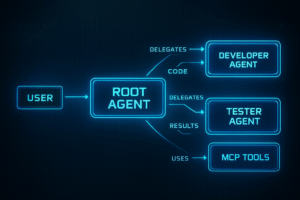
    sub_agents: ["developer", "tester"]
    toolsets:
      - type: think
      - type: todo

  developer:
    model: anthropic
    description: Code implementation specialist
    instruction: |
      Write clean, well-documented code:
      - Follow best practices
      - Include inline comments
      - Handle edge cases
      - Return working code
    toolsets:
      - type: think

  tester:
    model: anthropic
    description: Quality assurance specialist
    instruction: |
      Create comprehensive tests:
      - Unit tests for all functions
      - Edge case coverage
      - Clear test descriptions
      - Assertion-based validation
    toolsets:
      - type: think

models:
  anthropic:
    provider: anthropic
    model: claude-sonnet-4-0
    max_tokens: 64000
Try it:
cagent run dev-team.yaml

# Prompt: "Create a Python function to parse JSON with error handling"
# → developer writes code
# → tester creates tests
# → root reviews and delivers
Share Your Agents
Push to Docker Hub:
# Package and share
cagent push ./blog-writer.yaml username/blog-writer

# Pull and use shared agents
cagent pull username/blog-writer
cagent run username_blog-writer.yaml
Your team configurations become reusable, shareable assets.
Key Concepts Summary
Agent architecture:
- Root agent: User-facing coordinator
- Sub-agents: Specialized workers
- Tools: Built-in or MCP-connected capabilities
- Models: LLM providers (OpenAI, Anthropic, Google)
Isolation:
- Each agent has separate context
- No shared knowledge between agents
- Explicit task transfer required
Tool types:
- Built-in:
think,todo,memory,transfer_task - MCP: External services via Docker MCP Gateway
Common Patterns
Pattern 1: Coordinator + Specialists
root → delegates → [specialist1, specialist2, specialist3]Pattern 2: Sequential Pipeline
root → agent1 → agent2 → agent3 → rootPattern 3: Research + Synthesis
root → researcher (MCP tools) → writer → rootNext Steps
Experiment with:
- Different model combinations per agent
- Custom tool integrations via MCP
- Complex multi-agent workflows
- Persistent memory across sessions
Resources:
Start with a simple assistant. Add tools. Build teams. Ship to Docker Hub.
Your turn. What will you build?
Like | share | comment – Let us know the type of articles you would like to see
Feel free to connect with me