Your Complete Guide to State-of-the-Art, Open-Source Text-to-Speech in 23 Languages
What If Your Application Could Speak 23 Languages Fluently?
Imagine creating a voice assistant that seamlessly switches between English, Hindi, and Japanese—all while maintaining the same speaker’s voice characteristics. Or building an e-learning platform where content comes alive in students’ native languages without recording hundreds of hours of audio. This isn’t science fiction anymore.
Chatterbox TTS by Resemble AI has revolutionized how developers approach voice synthesis. With over 14,600 GitHub stars and MIT licensing, this production-ready model delivers what was once only available through expensive proprietary services—and it does so better.
graph LR
    A[Text Input] --> B{Chatterbox TTS}
    B --> C[English]
    B --> D[Spanish]
    B --> E[Hindi]
    B --> F[Japanese]
    B --> G[+ 19 More Languages]

    H[Voice Sample] --> B
    B --> I[Natural Speech Output]

    style B fill:#4A90E2,stroke:#333,stroke-width:3px
style I fill:#7ED321,stroke:#333,stroke-width:2pxWhat Makes Chatterbox Different?
For non-developers: Think of Chatterbox as a universal voice actor that can read any script in 23 languages while mimicking any voice you provide. It’s like having a multilingual narrator who can adjust their emotional intensity on command—from calm explanations to dramatic storytelling.
For developers: This is a 500M parameter Llama-backbone model trained on 500,000 hours of cleaned data, offering zero-shot voice cloning with sub-200ms latency. It outperforms commercial solutions like ElevenLabs in blind tests while remaining completely open-source.
Getting Started: Installation in 60 Seconds
Setting up Chatterbox requires minimal configuration. Here’s the entire installation:
# Create isolated environment
conda create -yn chatterbox python=3.11
conda activate chatterbox

# Install from PyPI
pip install chatterbox-tts

# Verify installation
python -c "from chatterbox.tts import ChatterboxTTS; print('Ready!')"
For developers wanting to customize the model:
git clone https://github.com/resemble-ai/chatterbox.git
cd chatterbox
pip install -e .
Your First Voice Generation
Let’s create natural-sounding speech with just a few lines:
import torchaudio as ta
from chatterbox.tts import ChatterboxTTS

model = ChatterboxTTS.from_pretrained(device="cuda")

text = "The future of voice technology is here, and it speaks your language."
wav = model.generate(text)
ta.save("output.wav", wav, model.sr)
What just happened? The model:
- Analyzed your text structure and context
- Generated phonetic representations
- Synthesized audio matching natural human prosody
- Embedded an imperceptible watermark for ethical AI tracking
sequenceDiagram
    participant User
    participant Model
    participant Generator
    participant Watermarker

    User->>Model: Text Input
    Model->>Generator: Processed Tokens
    Generator->>Watermarker: Raw Audio
    Watermarker->>User: Watermarked Output

    Note over Model,Generator: Zero-shot inference
Note over Watermarker: Perth WatermarkingMultilingual Magic: Speaking the World’s Languages
Switching languages is effortless:
from chatterbox.mtl_tts import ChatterboxMultilingualTTS

model = ChatterboxMultilingualTTS.from_pretrained(device="cuda")

# French synthesis
french_text = "Bonjour! Bienvenue dans le futur de la synthèse vocale."
wav_fr = model.generate(french_text, language_id="fr")
ta.save("french_output.wav", wav_fr, model.sr)

# Mandarin synthesis
chinese_text = "你好,今天天气真不错。"
wav_zh = model.generate(chinese_text, language_id="zh")
ta.save("chinese_output.wav", wav_zh, model.sr)
Supported languages span the globe: Arabic, Danish, German, Greek, English, Spanish, Finnish, French, Hebrew, Hindi, Italian, Japanese, Korean, Malay, Dutch, Norwegian, Polish, Portuguese, Russian, Swedish, Swahili, Turkish, and Chinese.
Voice Cloning: Personalization at Scale
Custom voice profiles require just a single reference audio:
REFERENCE_AUDIO = "speaker_sample.wav"

text = "This is my cloned voice speaking new content."
cloned_wav = model.generate(
    text,
    audio_prompt_path=REFERENCE_AUDIO,
    exaggeration=0.5,    # Emotion intensity: 0.0-1.0
    cfg_weight=0.5       # Style guidance: 0.0-1.0
)

ta.save("cloned_voice.wav", cloned_wav, model.sr)
Fine-tuning parameters:
# Configuration for dramatic content
dramatic_config:
  exaggeration: 0.7      # Higher emotional intensity
  cfg_weight: 0.3        # Slower, deliberate pacing

# Configuration for conversational agents
agent_config:
  exaggeration: 0.5      # Natural emotion
  cfg_weight: 0.5        # Balanced pacing

# Configuration for fast speakers
fast_speaker_config:
  cfg_weight: 0.3        # Compensate for speed
  exaggeration: 0.5      # Maintain naturalness
Architecture Deep Dive
flowchart TB
    Input[Text Input] --> Tokenizer[Text Tokenizer]
    Audio[Audio Reference] --> Encoder[Audio Encoder]

    Tokenizer --> Backbone[Llama 0.5B Backbone]
    Encoder --> Backbone

    Backbone --> Decoder[Audio Decoder]
    Decoder --> Vocoder[HiFT-GAN Vocoder]

    Vocoder --> WM[Perth Watermarker]
    WM --> Output[Speech Output]

    style Backbone fill:#FF6B6B,stroke:#333,stroke-width:3px
    style WM fill:#4ECDC4,stroke:#333,stroke-width:2px
    style Output fill:#95E1D3,stroke:#333,stroke-width:2px
The model’s architecture leverages:
- S3Tokenizer for efficient text processing
- Llama 3 backbone for context understanding
- HiFT-GAN vocoder for high-fidelity audio generation
- Perth watermarking for responsible AI deployment
Real-World Applications
E-Learning Platforms
Generate course narration in students’ native languages without hiring multiple voice actors:
course_script = {
    "en": "Welcome to Introduction to Physics.",
    "es": "Bienvenido a Introducción a la Física.",
    "hi": "भौतिक विज्ञान परिचय में आपका स्वागत है।"
}

for lang, text in course_script.items():
    wav = multilingual_model.generate(text, language_id=lang)
    ta.save(f"course_intro_{lang}.wav", wav, model.sr)
Voice Assistants
Build conversational AI with consistent personality:
responses = [
    "How can I help you today?",
    "I've found three options that match your preferences.",
    "Would you like me to provide more details?"
]

for idx, response in enumerate(responses):
    wav = model.generate(response, audio_prompt_path="assistant_voice.wav")
    ta.save(f"response_{idx}.wav", wav, model.sr)
Content Creation
Generate voiceovers for videos, podcasts, or audiobooks with emotion control:
dramatic_text = "The discovery would change everything we knew about the universe!"
wav = model.generate(
    dramatic_text,
    audio_prompt_path="narrator.wav",
    exaggeration=0.8,
    cfg_weight=0.3
)
Responsible AI: Built-In Watermarking
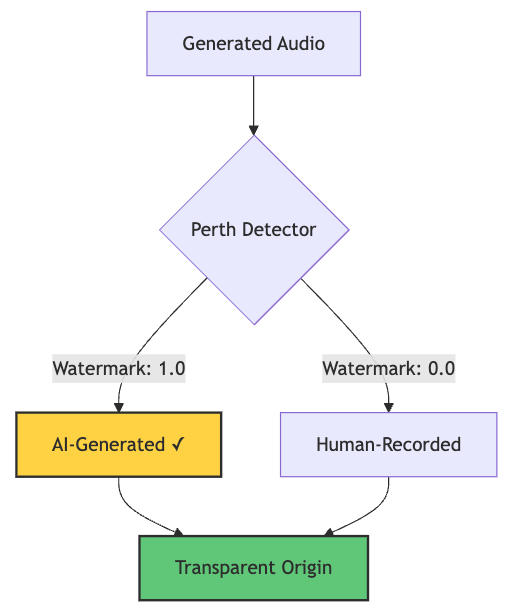
Every generated audio includes Perth watermarking—imperceptible signatures that survive compression and editing:
import perth
import librosa

watermarked_audio, sr = librosa.load("generated.wav", sr=None)
watermarker = perth.PerthImplicitWatermarker()

watermark = watermarker.get_watermark(watermarked_audio, sample_rate=sr)
print(f"Watermark detected: {watermark}")  # Output: 1.0 (watermarked)
This ensures traceability for AI-generated content—crucial for combating deepfakes and maintaining trust.
graph TD
    A[Generated Audio] --> B{Perth Detector}
    B -->|Watermark: 1.0| C[AI-Generated ✓]
    B -->|Watermark: 0.0| D[Human-Recorded]

    C --> E[Transparent Origin]
    D --> E

    style C fill:#FFD93D,stroke:#333,stroke-width:2px
    style E fill:#6BCF7F,stroke:#333,stroke-width:2px
Lexical error on line 3. Unrecognized text.
...1.0| C[AI-Generated ✓]    B -->|Waterma
-----------------------^
Performance Benchmarks
Chatterbox consistently outperforms commercial alternatives in blind listening tests. The model achieves:
- Sub-200ms latency for real-time applications
- Near-perfect watermark detection (>99% accuracy)
- 23-language support with zero-shot capability
- MIT licensing for commercial deployment
Quick Reference: Docker Deployment
Package your TTS service for production:
FROM python:3.11-slim

WORKDIR /app
RUN pip install chatterbox-tts torch torchaudio

COPY app.py .
EXPOSE 8000

CMD ["python", "app.py"]
# app.py - Simple API server
from fastapi import FastAPI, HTTPException
from chatterbox.tts import ChatterboxTTS
import uvicorn

app = FastAPI()
model = ChatterboxTTS.from_pretrained(device="cuda")

@app.post("/synthesize")
async def synthesize(text: str, language: str = "en"):
    try:
        wav = model.generate(text)
        return {"status": "success", "audio": wav.tolist()}
    except Exception as e:
        raise HTTPException(status_code=500, detail=str(e))

if __name__ == "__main__":
    uvicorn.run(app, host="0.0.0.0", port=8000)
The Bottom Line
Chatterbox TTS democratizes voice technology. Whether you’re building the next viral AI application, scaling e-learning platforms, or creating multilingual voice assistants, this open-source powerhouse delivers enterprise-grade quality without the enterprise price tag.
Resources
- GitHub: github.com/resemble-ai/chatterbox
- Demo Samples: Listen to examples
- Hugging Face Space: Try it live
- Documentation: Complete API reference in the repository
Ready to give your applications a voice? Clone the repository and start experimenting in minutes.