The hidden productivity killer every developer faces—and the elegant solution you didn’t know existed
The $50,000 Problem
Picture this: You’re deep in the zone, debugging a critical production issue. Your container logs are in one terminal, your database query tool is buried somewhere behind fifteen browser tabs, your security scanner is running in yet another window, and you just got pinged on Slack asking for the third status update in an hour.
Sound familiar?
According to recent productivity research, the average developer switches contexts 571 times per day, losing approximately 23 minutes per interruption getting back into flow state. That’s not just frustrating 🙁 it’s expensive. For a team of five developers, context-switching alone costs companies over $50,000 annually in lost productivity.
But what if you could bring your entire development toolkit into one unified dashboard? What if managing databases, monitoring containers, running security scans, and deploying applications could happen in a single interface, without ever leaving your Docker Desktop?
Enter Docker Extension, the productivity multiplier you’ve been searching for.
What Are Docker Extensions? (The Simple Version)
Think of Docker Desktop as your smartphone, and Docker Extensions as the App Store. Just as you enhance your phone with Instagram for photos, Spotify for music, and Maps for navigation, you can supercharge Docker Desktop with purpose-built tools that integrate directly into your container workflow.
Whether you’re a seasoned DevOps engineer or someone who just learned what a container is last week, Extensions make powerful development capabilities accessible with a single click.
graph TB
    A[Your Current Workflow] --> B{Multiple Tools}
    B -->|Window 1| C[Terminal]
    B -->|Window 2| D[Database Client]
    B -->|Window 3| E[Security Scanner]
    B -->|Window 4| F[Monitoring Tool]
    B -->|Window 5| G[Documentation]

    H[Docker Extensions Workflow] --> I[Docker Desktop]
    I --> J[Unified Dashboard]
    J --> K[All Tools Integrated]
    K --> L[One Interface]

    style A fill:#ff6b6b
    style H fill:#51cf66
style L fill:#51cf66Why Developers Are Making the Switch
The value proposition is deceptively simple, but the impact is profound. Here’s what Docker Extensions deliver:
1. Seamless Tool Integration
Connect your favorite development tools directly to your workflows—no more juggling applications or losing track of terminal windows. Everything lives where you’re already working.
2. Enhanced Functionality Without the Complexity
Augment Docker Desktop with capabilities for debugging, testing, security scanning, and networking. The power of enterprise-grade tools without the enterprise-grade headaches.
3. One-Click Installation
The Extensions Marketplace offers instant access to dozens of vetted tools. Discover, install, and start using new capabilities in seconds, not hours.
4. Complete Customization
Can’t find what you need? The Extensions SDK empowers you to build custom solutions tailored to your exact requirements. If you can imagine it, you can build it.
Building Your First Extension: A 15-Minute Guide
Creating a Docker Extension isn’t rocket scienc,it’s actually surprisingly straightforward. Let me walk you through it.
Prerequisites
Before we start, ensure you have the latest version of Docker Desktop installed. That’s it. Seriously.
Step 1: Scaffold Your Extension
The fastest way to get started is using the built-in initialization command:
docker extension init my-awesome-extension
This single command generates a complete boilerplate project:
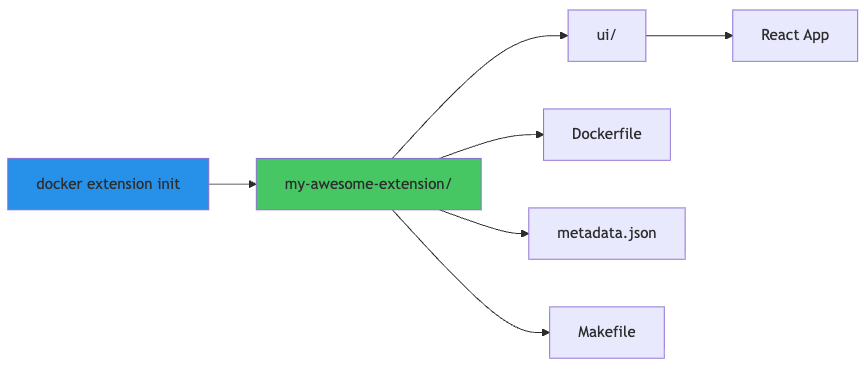
graph LR
    A[docker extension init] --> B[my-awesome-extension/]
    B --> C[ui/]
    B --> D[Dockerfile]
    B --> E[metadata.json]
    B --> F[Makefile]

    C --> G[React App]

    style A fill:#339af0
    style B fill:#51cf66
Parse error on line 2: ...my-awesome-extension/] B --> C[ui/] -----------------------^ Expecting 'SPACE', 'GRAPH', 'DIR', 'subgraph', 'SQE', 'end', 'AMP', 'TAGEND', 'START_LINK', 'STYLE', 'LINKSTYLE', 'CLASSDEF', 'CLASS', 'CLICK', 'DOWN', 'UP', 'DEFAULT', 'NUM', 'COMMA', 'ALPHA', 'COLON', 'MINUS', 'BRKT', 'DOT', 'PCT', 'TAGSTART', 'PUNCTUATION', 'UNICODE_TEXT', 'PLUS', 'EQUALS', 'MULT', 'UNDERSCORE', got 'INVTRAPEND'
What you get:
- ui/ – A sample React application for your extension’s interface
- Dockerfile – Multi-stage configuration to build everything into one image
- metadata.json – Configuration telling Docker Desktop how to run your extension
- Makefile – Convenient build commands
The SDK scaffolds a Go backend by default, but here’s the beautiful part: you can swap it with any language or framework that runs in a container and communicates over a Unix socket; Node.js, Python, .NET, take your pick.
Step 2: Build and Install
Docker Extensions are packaged as standard Docker images, making distribution simple:
# Build your extension
make build-extension

# Or use the underlying command directly - use the build buildx so that you images are comptible with ARM and AMD devices
docker buildx build --platform linux/amd64,linux/arm64 -t yourname/my-awesome-extension:<version(example:1.0.0)> .

# Install it locally
docker extension install yourname/my-awesome-extension
Critical detail: Extensions must follow standard naming conventions <user>/<repo>:<tag>, even for local development. After installation, your extension appears as a new tab in Docker Desktop’s dashboard.
Step 3: Rapid Development with Hot Reloading
Here’s where the magic happens for fast iteration. Full rebuilds work but are painfully slow. Instead, use hot reloading for instant UI updates:
cd ui
npm run dev
docker extension dev ui-source yourname/my-awesome-extension:<version> http://localhost:3000

# Open Chrome DevTools for debugging
docker extension dev debug yourname/my-awesome-extension:<version>

# Reset development settings when finished
docker extension dev reset yourname/my-awesome-extension:<version>
Your interface updates instantly on save—no rebuild required. For backend changes, you’ll still need to rebuild and run make update-extension, but frontend iteration is lightning fast.
sequenceDiagram
    participant Dev as Developer
    participant UI as React UI
    participant Hot as Hot Reload
    participant DD as Docker Desktop

    Dev->>UI: Save code changes
    UI->>Hot: Detect changes
    Hot->>DD: Update interface
    DD->>Dev: Instant preview

Note over Dev,DD: Zero rebuild time!Want to Go Deeper?
The official documentation is exceptional—here are the essential resources:
- Introduction to Docker Extensions
- Create Your First Extension
- Authentication Guide
- Kubernetes Integration
Plus video tutorials from DockerCon and community leaders on YouTube.
Real-World Impact: The SurrealDB Extension Story
Theory is nice. Reality is better. Let’s examine a production-ready extension that showcases what’s possible: the SurrealDB Docker Extension.
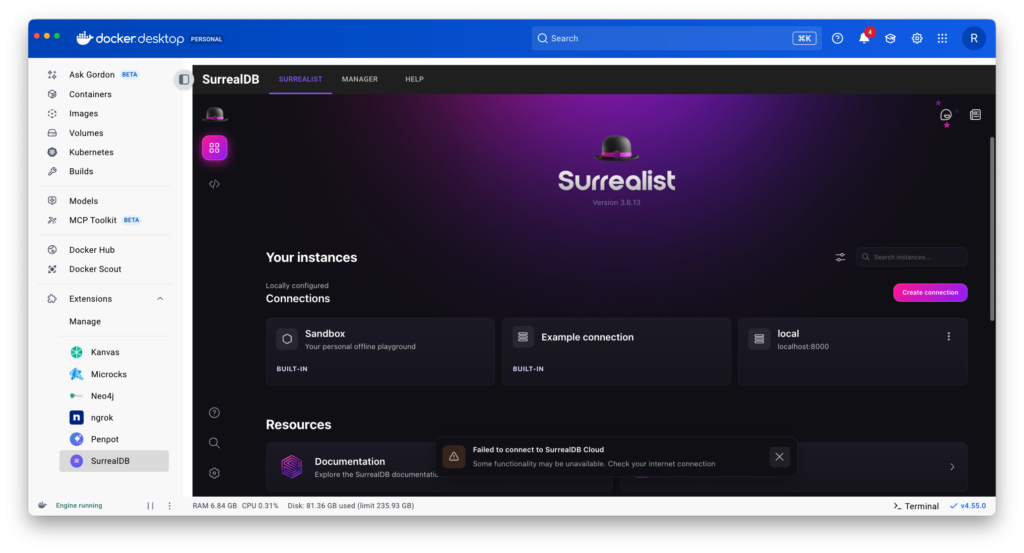
The Problem It Solves
Managing database instances traditionally means:
- Opening multiple terminal windows
- Memorizing connection strings
- Manually tracking running instances
- Switching between query tools and container management
- Fighting with configuration files
The SurrealDB Extension eliminates all of this friction.
What It Delivers
A complete database management interface embedded directly in Docker Desktop:
✓ One-Click Instance Management – Start, stop, restart database instances without touching the command line
✓ Integrated Query Editor – Write and execute SurrealQL queries with syntax highlighting and error detection right in the dashboard
✓ Visual Data Explorer – Browse tables and inspect data through a clean, intuitive interface
✓ Simplified Configuration – Customize connection parameters and preferences without editing config files
graph TB
    subgraph "Traditional Workflow"
        A1[Terminal 1: Start DB] --> A2[Terminal 2: Connect]
        A2 --> A3[Browser: Query Tool]
        A3 --> A4[Terminal 3: Check Status]
        A4 --> A5[Config File: Update Settings]
    end

    subgraph "With SurrealDB Extension"
        B1[Docker Desktop] --> B2[SurrealDB Extension]
        B2 --> B3[All Operations in One Place]
    end

    style A1 fill:#ff6b6b
style B3 fill:#51cf66Under the Hood: Architecture That Works
The extension’s architecture demonstrates elegant simplicity:
flowchart TD
    A[Docker Desktop] -->|Hosts| B[SurrealDB Extension UI]
    B -->|Contains| C[Database Manager]
    C -->|Communicates With| D[SurrealDB Container]
    D -->|Manages| E[(Database)]

    style A fill:#2496ED
    style B fill:#FF00A0
    style D fill:#9945FF
style E fill:#00D4AAComponents:
- Docker Desktop provides the foundation
- SurrealDB Extension UI delivers the interface
- Database Manager (Surrealist) handles operations
- SurrealDB Container runs the database
- Database stores your data
Data Flow in Action
When you execute a query, here’s what happens behind the scenes:
sequenceDiagram
    participant User
    participant UI as React UI
    participant Container as SurrealDB Container
    participant DB as Database

    User->>UI: Write query
    UI->>Container: HTTP POST /sql
    Container->>DB: Execute SurrealQL
    DB-->>Container: Query results
    Container-->>UI: JSON response
    UI-->>User: Formatted display

    Note over User,DB: Milliseconds from query to result
The flow:
- You write a query in the React-based interface
- UI sends an HTTP POST request to
/sqlendpoint - SurrealDB Container processes the request
- Database executes the SurrealQL query
- Results return as JSON
- UI formats and displays data
Get Started Today
While the SurrealDB extension awaits its official Marketplace release, you can build and install it from source right now:
# Clone the repository
git clone https://github.com/Raveendiran-RR/surrealdb-docker-extension.git

# Navigate to the directory
cd surrealdb-docker-extension

# Build the extension
docker buildx build --platform linux/amd64,linux/arm64 -t raveendiranrr/surrealdb-docker-extension:1.0.0 --push .

# Install it
docker extension install raveendiranrr/surrealdb-docker-extension:1.0.0
Navigate to the extension in Docker Desktop and try these sample queries:
-- Create a new user
CREATE users SET
    name = "John Doe",
    age = 30,
    email = "john@example.com";

-- Select all users
SELECT * FROM users;

-- Update a user's information
UPDATE users SET age = 31
WHERE name = "John Doe";

-- Remove a user
DELETE users
WHERE name = "John Doe";
The Extensions Ecosystem: What’s Available
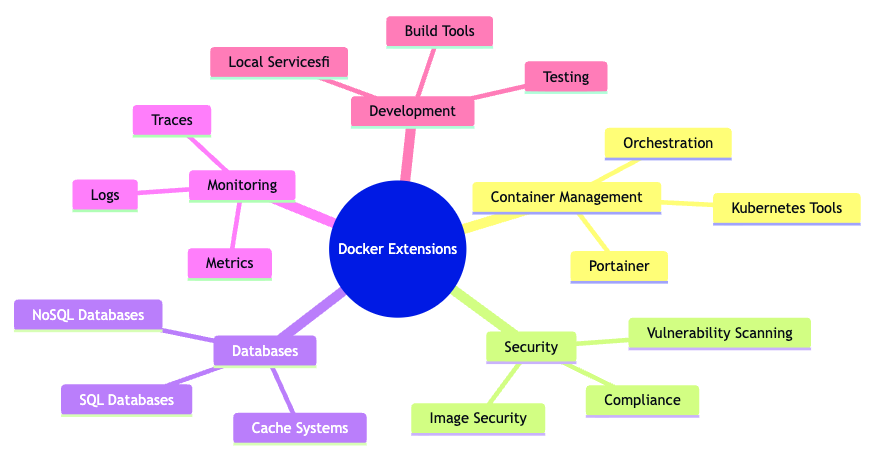
The Docker Extensions Marketplace has grown exponentially, with tools spanning every aspect of the development lifecycle:
Container Management & Orchestration
- Portainer for comprehensive container management
- Lens for Kubernetes cluster management
- K3s for lightweight Kubernetes
Security & Compliance
- Snyk for vulnerability scanning
- Aqua Trivy for image security
- Anchore for compliance checking
Databases & Data
- SurrealDB for cloud-native databases
- Redis Stack for in-memory data stores
- PostgreSQL management tools
Monitoring & Observability
- Datadog for application monitoring
- Grafana for metrics visualization
- OpenTelemetry for distributed tracing
Development & Testing
- Nx Console for monorepo management
- Testcontainers for integration testing
- LocalStack for AWS service emulation
mindmap
  root((Docker Extensions))
    Container Management
      Portainer
      Kubernetes Tools
      Orchestration
    Security
      Vulnerability Scanning
      Compliance
      Image Security
    Databases
      SQL Databases
      NoSQL Databases
      Cache Systems
    Monitoring
      Metrics
      Logs
      Traces
    Development
      Testing
      Build Tools
      Local Services
Parse error on line 1: mindmap root((Dock ^ Expecting 'NEWLINE', 'SPACE', 'GRAPH', got 'ALPHA'
The Business Case: ROI in Real Numbers
Let’s talk money. Docker Extensions aren’t just convenient—they’re financially compelling:
Time Savings:
- Average context switch: 23 minutes
- Switches prevented per day: 50-100
- Time saved per developer: 2-3 hours daily
- Annual value per developer: $15,000-$25,000
Error Reduction:
- Configuration mistakes: -60%
- Security vulnerabilities missed: -40%
- Deployment failures: -35%
- Cost of prevented incidents: $50,000-$100,000
Onboarding Acceleration:
- New developer productivity: Day 1 instead of Week 2
- Training time reduced: 40%
- Faster time to contribution: 1-2 weeks saved
For a team of 10 developers, adopting Docker Extensions typically delivers $200,000+ in annual value through time savings, error prevention, and faster onboarding.
Your Next Steps
The container revolution transformed how we build and deploy software. Docker Extensions are transforming how we interact with that software.
Start small:
- Browse the Extensions Marketplace in Docker Desktop
- Install 2-3 extensions that solve your immediate pain points
- Experiment with building a simple custom extension
- Share your wins with your team
Go big:
- Audit your development workflow for context-switching hotspots
- Build custom extensions for your organization’s unique needs
- Contribute to open-source extension projects
- Evangelize Extensions within your engineering organization
The tools are free. The SDK is open. The community is welcoming. The only question left is: What part of your workflow will you supercharge first?
Quick FAQ
Q: Do Extensions cost money? A: No. Docker Extensions are completely free to use, with no limits on how many you can install.
Q: Can I build Extensions with my preferred language? A: Absolutely. While the SDK scaffolds Go backends by default, you can use any language that runs in a container and communicates over Unix sockets—Python, Node.js, .NET, Java, you name it.
Q: Are Extensions secure? A: Extensions run in isolated containers with limited permissions. Docker applies security reviews to Marketplace extensions, but always review permissions before installing any extension, just like you would with browser extensions or mobile apps.
Q: Can I use Extensions in production? A: Docker Desktop (and Extensions) are designed for development environments. For production, use Docker Engine and Kubernetes.
Q: How do I share an extension with my team? A: Build your extension as a Docker image and push it to any container registry (Docker Hub, GitHub Container Registry, etc.). Team members install it using docker extension install your-registry/extension-name.
Ready to eliminate context-switching and unlock your team’s full productivity potential? Explore the Docker Extensions Marketplace today, or build your first custom extension this afternoon. Your future self will thank you.
Resources: